Here are the most common problems people run into and how to fix them, followed by quick answers to the questions newcomers ask first. If you don’t see your issue here, ask the assistant in Chat. It knows how Svanja works and can check the state of your mailboxes. You can also write to us using the options at the bottom of this page.
When a mailbox won’t connect or sync
Svanja connects to the mailbox you already have, so most issues here come from signing in at your mail provider.
Microsoft says I need admin approval
Some companies only allow apps that an administrator has approved first. You’ll see a link on the connect page. Send it to your Microsoft 365 administrator, then try connecting again once they approve Svanja.
My outlook.com or hotmail.com address doesn’t connect
Personal Microsoft addresses like outlook.com, hotmail.com, and live.com don’t work right now. Microsoft 365 work and school mailboxes do.
Svanja says my password is wrong
Some providers, like iCloud and Yahoo, require an app password instead of your regular password. You can create one in your provider’s account settings. While you’re there, check that IMAP is turned on. The error message tells you whether the incoming (IMAP) or outgoing (SMTP) server failed.
My mailbox stopped syncing
Go to Settings, choose Mail management, and open the mailbox. The Connection tab explains what happened and gives you the button to fix it, such as Sign in again, Update login details, or Repair mailbox. See Connecting your mailbox.
The first import seems stuck
Your Inbox shows how much mail has loaded. If nothing moves for a long time and the Connection tab says Setup appears stuck, choose Restart setup. Svanja keeps any email it has already loaded.
When an email is missing or won’t send
Svanja shows the mail from your provider, but a few things, like Done and drafts, only live in Svanja. That usually explains what’s going on.
An email I expect isn’t there
- Check which mailbox is selected above the list. If you’ve picked one mailbox, the others are hidden.
- If you marked the email as Done, it’s out of your Inbox. Try searching for it.
- Svanja loads the last 90 days first. Search still finds older emails at your provider.
- If you see a line saying “Live updates are paused”, choose Refresh.
I marked an email as Done, but my phone still shows it
Marking an email as Done only changes it in Svanja. To archive it at your provider too, open More and choose Archive in mailbox. See Your inbox.
My draft isn’t in my phone’s Drafts folder
Drafts you write in Svanja stay in Svanja until you send them. You’ll find them under Drafts in the Svanja sidebar.
I can’t see a colleague’s mailbox
Everyone needs permission to read a mailbox, including owners and administrators. Ask someone who manages the mailbox to give you Can read on its People tab. See Working together in shared mailboxes.
I can’t send from an address
Check three things on the mailbox’s page under Mail management:
- You have Can read for the mailbox.
- The address shows Ready to send.
- You have permission to send from that address.
Someone who manages the mailbox can fix the last two.
When the assistant or a task doesn’t do what I expect
By default, the assistant asks before anything leaves Svanja, and AI work pauses if your credits run out. If something is waiting, it’s usually one of these.
The assistant wrote a reply but didn’t send it
Every account starts this way. The assistant asks before sending any email until you change that in Settings, Assistant. Find the card in the email, chat, or task and choose Send. See What the assistant may do on its own.
The assistant says it can’t find something
The assistant can only read what you can read. Make sure you can open the mailbox or Space yourself, and check that Hide from the assistant is turned off in the Space’s settings. For a connected service, check its status under Connections.
A task is waiting
Open it in Tasks. The task page tells you what it’s waiting for: an answer, your OK, a sign-in, credits, or a free slot while other tasks finish. See Tasks.
Svanja says it paused AI work
If far more tasks start or far more credits get used than usual within 10 minutes, Svanja pauses AI work for your team. A rule stuck in a loop can trigger this, so check your rules first. Once that’s sorted, an owner or administrator can resume AI work from the chat, and paused tasks will pick up again.
When a rule didn’t run or picked the wrong email
Rules start work on their own when an email arrives or on a schedule. A rule’s page always tells you whether it’s running and, if not, why.
My rule didn’t run
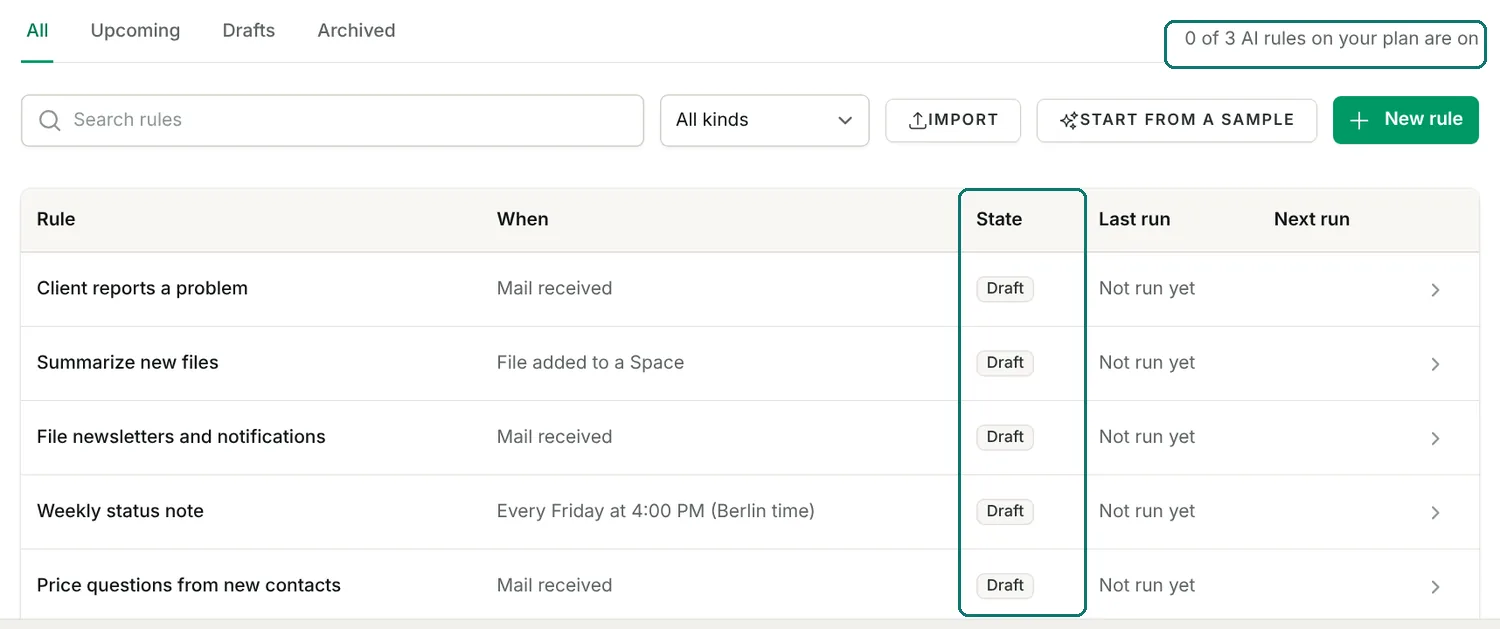
Open it in Rules. The top of the page shows its state:
| State | What to do |
|---|---|
| Draft | Nothing runs until you enable it. |
| Paused | Choose Resume. |
| Needs attention | Something it uses is missing, like a folder, tag, or Space. The page tells you what to change. |
| Shows missed runs | Your credits ran out. Choose Run now on a missed run. |
On Free, only 3 rules with AI can be active at the same time. To see why a rule ignored an email, open the email and choose Check rules for this message.
My rule picks the wrong emails
Open the run and choose This should not have matched. The assistant adds a condition to a draft of the rule. Test the draft, then enable it. See Rules.
When a connection, alert or Space doesn’t work
Each of these depends on a permission somewhere: at the connected service, in your browser, or in your team.
A connection asks to be reconnected
Access at the service expired or was revoked. Open the connection under Connections and choose Reconnect with the same account. Any tasks waiting on it will continue.
Phone alerts don’t arrive
- In Settings, Notifications, choose Turn on for this device on that phone.
- Allow notifications for app.svanja.com in your browser’s settings.
- On an iPhone or iPad, add Svanja to the Home Screen first.
- Check that Phone is ticked for that alert in the same list.
See Notifications.
I can’t open a Space
Only people added to a client or project Space can open it. Choose Ask for access, and your team’s owners and administrators will get the request.
Questions newcomers ask
Quick answers to the things people usually want to know before they start.
Do I have to move my email to Svanja?
No. Your email stays with your mail provider, and Svanja connects to it. You keep your address, and the mail app on your phone keeps working.
Which mailboxes work?
Microsoft 365 work and school mailboxes, plus any other mailbox that supports IMAP and SMTP. See Connecting your mailbox.
Can I use Svanja without the AI?
Yes. Mail, contacts, notes, and files all work on their own and never use credits. Rules that only sort mail are free too.
Is my email used to train AI models?
No. Svanja uses the AI providers’ business services, which don’t use your content for training. See Your data and privacy.
What does Svanja cost?
Free costs nothing and includes one mailbox and 300 credits a month. Pro is €29 a month. Team is €24 per member a month, starting at 2 members. Prices don’t include VAT. See Plans, credits and prices.
Still stuck?
Open Help and choose Send Message so we know which account you’re using. You can also email support@svanja.com. If an API call went wrong, include the request ID from the X-Request-Id header.